
Best for:
With the DHL shipment tracking API pivate and business customers can query the shipment status and history of shipments at any time.
You are on the documentation page of the DHL Parcel DE Shipment Tracking API of Post & Parcel Germany. In the following chapters we offer you:
- An Overview of the business functions covered via the API
- The technical documentation of the API
- The User Guide contains topics of connection and authentication
- WADL as technical description with examples in Reference Docs
- A test suite with example calls as a Postman Collection at Downloads
- Find further Use Cases, FAQ and Support Contact in section Additional Information
- Latest there are Release Notes
Scope
With the DHL shipment tracking API you can query the shipment status and history of shipments at any time.
The query is based on different requests:
- Shipment tracking API for public use ("public" query) - the data is provided in the same way as for public shipment tracking (www.dhl.de).
- Shipment tracking API for business customers ("business" query) - all relevant shipment data is supplied, limited to the shipments of a business customer.
Using the API
The following information is provided:
- Detailed information on the shipment status (providing the zip code might be required)
- Showing the shipment history
- Product/Services Information
- Estimated delivery date / estimated delivery time window (separate right required)
- Sender, recipient and delivery details (track and trace for business customers)
The DHL Shipment Tracking API provides shipment data for the following products:
- DHL Paket (national/international) shipments
- DHL Retoure (national/international)
- Warenpost shipments
- DHL 2 man handling shipments
- import shipments
The MyDHL API is available for DHL Express shipments. All relevant information can be viewed here.
There is also the option of using an HTTP direct access link display the search result for a specific shipment directly on www.dhl.de.
Integration options through APIs
The shipment tracking service can be integrated in different ways. Below is a summary of the different integration options.
| Solution | Use cases and target groups |
|---|---|
| Tracking API for public use ("public" query) | Integration into customer systems to display the current shipment status ( e.g .: in order overview). Use of the shipment data for after-sales management (e.g. sending evaluation requests after the shipment has been delivered). |
| Shipment tracking API for business customers ("businessi" query) | Integration and further processing of the shipment status in in-house systems to support processes such as customer service, invoicing or dunning |
Tracking API for public use ("public" query)
Up to 15 shipment numbers or reference numbers*) can be queried at the same time. The search takes place over the last 3 months.
In order to display the data e. g. for "Location" and the adress of the branch/Packstation, the recipient's postal code must be provided.
In case of online returns, it is necessary to enter the sender's zip code in order to obtain further information.
The response does not contain any data protection-related information about the sender / recipient.
*) The reference number must be uniquely assigned to a shipment number.
Access requirements:
In order to be able to use this interface, you need access to DHL shipment tracking. Please contact your DHL sales contact person to obtain a user ID and password.
Note: For data protection reasons, the user ID and password provided may not be passed on to third parties. Furthermore, restrictions on the query volume and a performance-optimized design of the retrievals must be observed.
Shipment tracking API for business customers ("business" query)
For individual requests, we recommend that you include the postal code in the request in order to retrieve the maximum shipment information.
Up to 20 shipment numbers or reference numbers *) of a DHL business customer can be queried at the same time. It is not possible to specify a postal code for these collective queries.
The proof of delivery can be queried via a further request.
*) The reference number must be able to be clearly assigned to a shipment number.
Access requirements:
In order to be able to use this interface, you need business customer access. To be activated as a DHL contract customer and to receive a user ID and password for DHL shipment tracking for business customers, please contact your DHL sales contact person.
Note: Since the call provides sensitive customer data, this information may only be displayed in your internal systems. For data protection reasons, the user ID and the associated password provided may not be passed on to third parties. Furthermore, the limitation of the query volume and a performance-optimized design of the retrievals must be observed.
Integration options through HTTP direct access link
The HTTP direct call link is a parameterized URL call that displays the search result for a specific shipment directly on www.dhl.de.
This direct access link can be used e.g. in a shipping confirmation e-mail received by the recipient to enable direct access to the status of a shipment in the "Track" function (DHL shipment tracking). Another possible use is the link to the shipment status from the order overview of the mail order company.
Up to 15 shipment numbers or reference numbers can be queried at the same time. The search is carried out over a clearly defined period of the past 3 months
Advantages of forwarding to DHL Paket shipment tracking:
- Display of the current shipment status
- Live tracking display (if available)
- Selection of recipient services such as depositing a specific storage location, delivery to a neighbor, a branch or packing station instead of to the recipient's home address, and changing the delivery date
- Context-related linking to additional help pages and contact option for DHL customer service
Since DHL shipment tracking is public information, the display does not provide any information on the sender / recipient that is relevant to data protection. For detailed shipment information on the sender / recipient, the postal code must therefore also be entered.
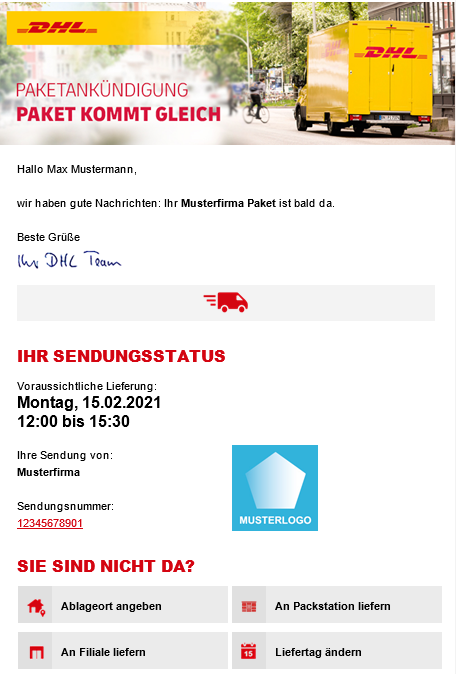
Example - integration of a direct access link in an e-mail:
Technical description of the HTTP direct call link
URL: https://www.dhl.de/de/privatkunden/pakete-empfangen/verfolgen.html
|
Attributes |
Description |
Example |
|
piececode |
Search by consignment number or reference number |
https://www.dhl.de/de/privatkunden/pakete-empfangen/verfolgen.html?piececode=XXXXXXXXXX |
|
lang |
Desired language for the result message in German or English (2-digit ISO country code "de" for display in German or "en" for display in English) |
https://www.dhl.de/de/privatkunden/pakete-empfangen/verfolgen.html?piececode=XXXXXXXXXX&lang=de https://www.dhl.de/en/privatkunden/pakete-empfangen/verfolgen.html?piececode=XXXXXXXXXX&lang=en |
For the languages German and English, this direct call link should always be used, as the "Track" function at www.dhl.de offers subsequent additional options.
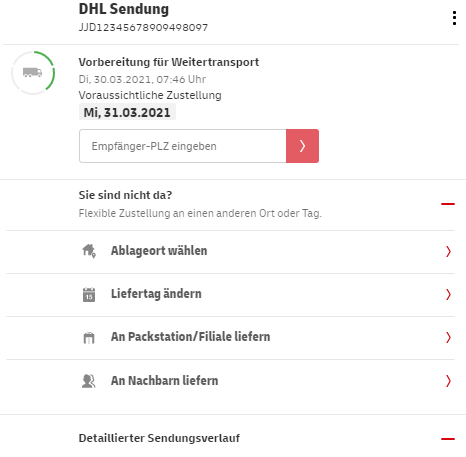
Example for the selection of recipient service options such as the choice of delivery location and delivery day:
Advanced language selection:
If you would like to select advanced languages (other than German "de" and English "en") in your shipping confirmation emails, please use this URL:
https://nolp.dhl.de/nextt-online-public/
|
Attributes |
Description |
Example |
|
piececode |
Search by shipment number or reference number |
https://nolp.dhl.de/nextt-online-public/?piececode=XXXXXXXXXX |
Adopt browser language:
By using this link, the user's browser language is detected and the DHL shipment tracking is displayed in the following languages:
- French
- Spanish
- Italian language
- Dutch
This means that if the user has selected "French" as their preferred browser language, for example, the DHL shipment tracking will also be displayed to them in French. For all browser language settings that do not include French, Spanish, Italian or Dutch, the display will automatically be in English.
Get Access
How to register your DHL Parcel DE Shipment Tracking API and get your API subscription keys:
- Click Get Access Button on top of this page and the create App form will open with the sandbox environment of the API being pre-selected.
- If required, change selection to "DHL Parcel DE Shipment Tracking API"
- When you have completed the form, click the Create App button.
- You will now find your App under My Apps.
- From the My Apps screen, click on the name of your app.
The Details screen appears. - If you have access to more than one API, click the name of the relevant API.
Note: The APIs are listed under the "Credentials" section. - Click the Show link below the asterisks that are hiding the Consumer Key.
The Consumer Key appears.
Every call to the API requires a consumer key. This key needs to be specified in the request header (DHL-API-Key).
Please note that different keys are required for sandbox respectively production environment. Both can be requested via above procedure and copied from API credentials section.
Alternatively to "get access" you can go to My Apps on the portal website and click the + Create App button:
- The "Create App" form appears.
- .Complete the Create App form and select the "Parcel DE Tracking (Post & Parcel Germany)".
- You will find two entries of the API in the list: one for Sandbox, one for Production use.
Authentication
To be able to use the DHL Parcel DE Shipment Tracking API, you need:
- API Gateway Authenticatoin "App"
- can be requested via the Get Access button at the top of this page
- consists of API key and API secret as basic authorization
- User of the Post & DHL Business Customer Portal
- a user is created in the Post & DHL business customer portal by an administrator of the business customer
- "Track parcels & goods" function must be set up to use the shipment tracking API for business customers
This applies to both, sandbox and production environment.
Sandbox
To use the DHL Parcel DE Shipment Tracking API, you first need to authenticate your app in the environment: Customer (Integration) Testing.
In addition, the following access data must be entered in the web service:
- Username: zt12345
- Password: geheim
The username and password specified above must be entered in the XMLpart of the request:
<?xml version="1.0" encoding="UTF-8" standalone="no"?> <data appname="zt12345" language-code="de" password="geheim" piece-code="shipmentnumber" request="d-get-piece-detail"/>
Note: If special characters in the password have a specific meaning in HTML, you must mask these characters.
https://wiki.selfhtml.org/wiki/Referenz:HTML/Zeichenreferenz
Production
To use the DHL Parcel DE Shipment Tracking API, you first need to authenticate your app in the environment: Production (Global), Production (Europe).
In addition, the following access data must be entered in the web service:
- Username: "User from Post & DHL Business Customer Portal".
- Password: "Password of above user".
The username and password specified above must be entered in the XMLpart of the request:
<?xml version="1.0" encoding="UTF-8" standalone="no"?> <data appname="Username" language-code="de" password="Password" piece-code="shipmentnumber" request="d-get-piece-detail"/>
Note: If special characters in the password have a specific meaning in HTML, you must mask these characters.
https://wiki.selfhtml.org/wiki/Referenz:HTML/Zeichenreferenz
Environments
The addressable API base URL/URI environments are:
Error Handling
Status codes
The following list (german and english) offers a summary of the status codes available in the DASS interface at the time the document was created. The status code and status text is provided via the attributes code and error or piece-status and piece-status-desc for NOLP calls.
| Code | Sprache | Fehler |
|---|---|---|
| -1000 | de | Ein technischer Fehler ist aufgetreten! Bitte kontaktieren Sie den Support! |
| -3 | de | Abfrage unbekannt. |
| -2 | de | Interner SQL-Datenbank-Abfrage-Fehler. |
| -1 | de | Keine Verbindung zur Datenbank. |
| 5 | de | Anmeldung fehlgeschlagen. |
| 6 | de | Zu viele ungültige Logins. Versuchen Sie es bitte später erneut. |
| 41 | de | IDC-Prüfsumme ungültig. |
| 45 | de | Kein Piece-Code eingegeben. |
| 57 | de | Zur vorgegebenen PLZ sind keine Informationen verfügbar. |
| 58 | de | Parameter ekp-no fehlt. |
| 59 | de | Weder Parameter piece-code noch Parameter tas-order-no spezifiziert. |
| 60 | de | Nur ein Parameter piece-code oder tas-order-no erlaubt. |
| 61 | de | Keine Sendungsdaten zur TAS-Auftragsnummer gefunden. |
| 62 | de | Bearbeitung wegen fehlender Berechtigung abgebrochen (Servlet-Request). |
| 63 | de | Unterschriften sind wegen fehlender Verbindung zum Archiv-Server nicht verfügbar. |
| 64 | de | Keine Bearbeitung möglich: Recht zur Anfrage ohne Prüfziffer fehlt. |
| 100 | de | Keine Daten gefunden. |
| 200 | de | Es liegen keine elektronischen Sendungsdaten vor. |
| Code | Language | Error |
|---|---|---|
| -1000 | en | A technical error has occurred! Please contact support! |
| -3 | en | Unknown request. |
| -2 | en | Internal error executing SQL query. |
| -1 | en | No connection to the database. |
| 5 | en | Login failed. Not authorized. |
| 6 | en | Too many invalid logins. Please try again later. |
| 41 | en | IDC-Checksum invalid |
| 45 | en | No Piece-Code supplied. |
| 57 | en | No information available using the specified ZIP-code |
| 58 | en | Parameter ekp-no is missing. |
| 59 | de | Neither parameter piece-code nor tas-order-no specified. |
| 60 | en | Only one parameter piece-code or tas-order-no allowed. |
| 61 | en | No shipment data found for TAS order number. |
| 62 | en | Processing canceled due to missing authorization (servlet request). |
| 63 | en | Signatures are not available due to lack of connection to the archive server. |
| 64 | en | No processing possible: right to request without check digit missing. |
| 100 | en | No data found. |
| 200 | en | There are no electronic shipment data available. |
We recommend using the Postman software to test the API. Postman is a collaboration platform for API development and testing. Post & DHL Germany provides you with a comprehensive Postman Test Collection for each API. Follow the instructions in this chapter to import the test collection into your Postman workspace and quickly start integrating our API.
The following steps have to be done first to test the API:
You need to request access to the sandbox environment to obtain an API key (dhl-api-key).
You can find detailed instructions on how to do this under Get Access.
Setting up the Postman Test Collection
- Download the Postman Test Collection in download area.
- Import the Postman Test Collection (see official documentation of the Postman learning platform.
- Replace the value of the variable "dhl-api-key" with your personal API key.
Please also refer to our step-by-step instructions for using the Postman Test Collection.
As a logged-in user of the Group API Developer Portal, you have the opportunity to access detailed video tutorials. These tutorials provide comprehensive guidance on using various APIs, including setting up system users, integrating into test environments, and making necessary adjustments for specific use cases. Take advantage of these valuable resources to deepen your knowledge and streamline your integration process. Video Tutorials
Overview
This chapter explains first steps of the system functionality by operational examples:
- get-status-for-public-user
- d-get-piece-detail
- d-get-signature
You will find more technical information in chapter "How to test the API".
Operations
Shipment tracking API for public use ("public" query)
- The public shipment tracking API already provides by design a smaller data scope that corresponds to shipment tracking for private customers.
- In the future, however, users will need to add the recipients postal code in order to display the data for "City/Town" and the warehouse address of the retail outlet/Packstation.
- In case of online returns, the senders postal code must be used.
- Important information:
- It is only possible to add the postal code when conducting a query using the shipment number (no references)
- It is only possible to add the postal code when conducting a single request for one shipment (multiple queries by adding the postal code are not possible)
- Should these data be required, it is necessary to transmit the postal code as an API call parameter
- We recommend implementation of this by CW 25
Shipment tracking API for business customers ("business" query)
- If shipment data are restricted, fields in the API response that contain personal data remain empty
- To fully display these data, it is necessary to transmit the recipients postal code as an API call parameter
- In the case of online returns, the senders postal code must be used
- Important information:
- It is only possible to add the postal code when conducting a query using the shipment number (no references)
- It is only possible to add the postal code when conducting a single request for one shipment (multiple queries by adding the postal code are not possible)
- The postal code can thus be preventively transmitted directly with the first request to ensure that all data are included in the first response
Private customer
- get-status-for-public-user:
Query of the current shipment status for public use
Business customers
- d-get-piece-detail:
Combined call-up of shipment status and route - d-get-signature:
Query for the signature of the recipient or substitute recipient (proof of delivery / POD)
General
No statistical data about the shipment of packages is provided via the shipment tracking API.
If several consignment numbers / reference numbers are queried, the result is returned in the form of a list.
If a shipment cannot be clearly identified (e.g. if a shipment number is not assigned twice within one year), the shipment results are also returned in the form of a list.
In order to restrict the result set from the outset, the attributes zip-code and from-date/to-date should be given when calling for a detailed search query.
Important information about the parameters
All functions have the following query parameters in common:
- User ID
appname
ID with which the customer authenticates himself for using the interface - Password
password
The password associated with the user ID - Language code (ISO Language Code)
language-code
The language code defines the language that is selected for the presentation of results. The following codes are currently possible:enfor Englishdefor German
All functions have an identical response behavior:
| How was the function called? | Response Behavior |
|---|---|
| The parameters were incomplete or incorrect | The request is aborted with a corresponding error message |
| The parameters were incomplete or incorrect | The consignment information you are looking for is reported back, provided that data is available for the consignment. |
| The DHL shipment tracking was not available at the time of the call | If there is a fault in the backend system, the system reports an error. If there is a problem with the web server, the request is terminated with an error after a timeout. |
Important: The attributes with the note "are no longer available!" should no longer be used for a client-side evaluation, since they will no longer be contained in the answer in the future!
Rights and Authentication
As a business customer of DHL you can use all functions. However, the individual functions are linked to rights that are assigned separately. If a function is not enabled for you, a corresponding error message will be sent when you call it. In this case, please contact your DHL customer advisor, who will check the authorization for your business customer account and have it extended accordingly.
Each time you call up the shipment tracking API, you must authenticate yourself as the user or the program using a user ID and password (see query parameters). Please note that the permissions to query shipments in the DHL shipment tracking area for business customers are linked to your DHL customer number (EKP) or to the shipment number range assigned to your business customer account. This ensures that access to the shipment status of third-party shipments is excluded.
For calls without a DHL business customer contract, you can only access the shipment tracking API area for public use ("public" query).
get-status-for-public-user
The "get-status-for-public-user" function provides information as it is currently displayed in the DHL public shipment tracking area ( www.dhl.de ).
The following special features apply to the "get-status-for-public-user" operation:
- The shipment query is possible via a shipment number or reference. Up to 15 consignment numbers or references can be transferred per call.
The individual numbers must be separated from each other by a semicolon. If several consignment numbers or shipment references are included in the query, there will be several elements in the response accordingly.
- If a shipment cannot be clearly identified (e.g. if a shipment number is not assigned twice within one year), the shipment results are returned in the form of a list. In order to restrict the result set from the outset, the attribute "zip-code" should be given when calling.
- In order to display the data for "Location" and the warehouse address of the branch/Packstation, the recipient's postal code must be provided. In case of online returns, the sender's zip code must be provided . Personal data will not be provided.
- Important instructions:
- The zip code only works when querying the shipment number ( no references)
- The post code only works with one request for a shipment (collective queries with post code are not possible)
- The number format is checked on the DHL side. If the structure does not correspond to a valid shipment number format, the shipment search for this shipment is aborted.
Sample Data
Request
https://api-eu.dhl.com/parcel/de/tracking/v0/shipments?xml=
<data
request="get-status-for-public-user"
appname="Benutzerkennung"
password="Passwort"
language-code="de">
<data
piece-code="961001046136"
piece-customer-reference=""
date-from="YYYY-MM-DD"
date-to="YYYY-MM-DD"
zip-code="12345"
>
</data>
</data>
Response
<?xml version="1.0" encoding="UTF-8" ?>
<data request-id="379d9788-5a8e-49dd-9f7e-d30e17746c2a">
<data name="piece-status-public-list"
code="0"
_piece-code="0231234
_zip-code="32584">
<data name="piece-status-public"
piece-identifier="231234"
_build-time="2012-06-06 18:18:10.000607"
piece-id="3b048653-aaa9-485b-b0dd-d16e068230e9"
leitcode=""
searched-piece-code="0231234"
piece-status="0"
identifier-type="2"
recipient-name="Hr. Hannes Testler"
recipient-id="1"
recipient-id-text="Empfänger (orig.)"
pan-recipient-name=" "
street-name=""
house-number=""
city-name=""
last-event-timestamp="11.03.2012 11:59"
shipment-type=""
status-next=""
status="Die Sendung wurde ausgeliefert."
error-status="0"
delivery-event-flag="1"
upu=""
international-flag="0"
piece-code="0231234"
ice="DLVRD"
ric="ACCPT"
division="DPEED"
dest-country="de"
origin-country="de"
product-code="00"
product-name="DHL PAKET"
searched-ref-no="034234"
standard-event-code="ZU"
pan-recipient-street=""
pan-recipient-city=""
event-country="de"
event-location=""
shipment-length="0.0"
shipment-width="0.0"
shipment-height="0.0"
shipment-weight="0.2" />
</data>
</data>
I/O Reference "get-status-for-public-users"
Request parameter
The following attributes can be passed via the <data> element:
| Attribute | Description |
|---|---|
| appname | User ID that the business customer has received for the use of API Shipment Tracking |
| password | The corresponding password |
| request | "get-status-for-public-user" by default in this call |
| zip-code | The postcode is used to uniquely identify a consignment. In addition, providing the postcode enables the provision of consignment data classified as "private". |
| language-code | Desired language for the result message (de or en) |
| piece-code | shipment number for which the status is to be queried. Up to 15 shipment numbers can be transmitted. The individual shipment numbers must be separated by semicolons. |
Bei einer optionalen Zeitraumabfrage sind folgende Parameter zu definieren:
| Attribute | Description |
|---|---|
| from-date | Start of the period (format: yyyy-mm-dd) |
| to-date | End of period (format: yyyy-mm-dd) |
Response Parameter
The attributes of a response have the following meaning:
| Attribute | Description |
|---|---|
| name | Name for the <data> element. The first element has the name "piece-status-public-list". The following one has the name "piece-status-public". |
| code | Status code for the request |
| error-status | Error status for the current shipment |
| piece-code | piece-code |
| piece-identifier | shipment number without Prefix |
| identifier-type | Describes the barcode type of the consignment number (1 = IDC, 2 = LP EAN, 3 = LP Ansi/Fact, etc.). |
| searched-piece-code | shipment number that was searched for |
| leitcode | Barcode of the shipment with routing information |
| routing-code-ean | Barcode of the shipment with routing information |
| pslz-nr | Internal field |
| recipient-name | Not filled |
| recipient-id | Recipient indicator - currently not filled! |
| recipient-id-text | Resolution Recipient identifier (original recipient, neighbour, spouse, other person present...) - currently not filled! |
| street-name | Not filled |
| house-number | Not filled |
| city-name | Not filled |
| pan-recipient-name | Not filled |
| pan-recipient-street | Not filled |
| pan-recipient-city | Not filled |
| dest-country | ISO code for the country of destination of the consignment (e.g. FR for France) |
| origin-country | ISO code for the country of origin of the consignment (e.g. DE for Germany) |
| delivery-event-flag | Delivery flag (1=delivered 0=not delivered) |
| international-flag | International-Fag (1=international shipment, 0=national shipment) |
| ruecksendung | Return flag (true=return, false=no return) |
| matchcode | Foreign shipment number |
| domestic-id | shipment number receiving country |
| upu | Internal field |
| airway-bill-number | Express shipment number for transport by DHL Express in the destination country |
| product-code | Product code |
| product-name | Product name (e.g. DHL Paket) |
| shipment-length | Parcel: Length (EDI data) |
| shipment-width | Parcel: Width (EDI data) |
| shipment-height | Parcel: Height (EDI data) |
| shipment-weight | Parcel: Weight (EDI data) |
| delivery-date | expected delivery date |
| delivery-timeframe-from | Estimated delivery time window of |
| delivery-timeframe-to | Estimated delivery time window until |
| order-preferred-delivery-day | Assignment-Delivery Day Flag (true=a delivery day has been assigned, false=there is no assignment of a delivery day) |
| preferred-delivery-day | Booked delivery day |
| preferred-delivery-timeframe-from | No longer used |
| preferred-delivery-timeframe-to | NNo longer used |
| preferred-timeframe-refused-text | No longer used |
| shipment-type | routing-code-ean |
| last-event-timestamp | Timestamp of the current event |
| status | Status text of the current event |
| Events | |
| event-timestamp | Timestamp Event |
| event-status | Status-Text Event |
| event-text | Status-Text Event |
| event-short-status | Short Status Text Event |
| division | Indicates the internal production line |
| ice | "International Coded Event" (see Annex ICE/RIC) |
| ric | "Reason Instruction Code (see attachment ICE/RIC) |
| standard-event-code | Standard code for the consignment event (see attachment standard-event-code) |
| event-location | Place of creation of the shipment event |
| event-country | Country of creation of the shipment event |
Important: The attributes with the note Is no longer available! should no longer be used for a client-side evaluation, as they will no longer be included in the answer in the future!
Attachment: ICE Event RIC Kombinationen_11_2023.csv
d-get-piece-detail
The "d-get-piece-detail" function retrieves all information about a shipment via a query. This is done by combining the query of the shipment status and the query of the shipment progress (events list).
The following special features apply to the "d-get-piece-detail" operation:
- The function can be accessed with a shipment number and a shipment reference.
- Up to 20 shipment numbers or references can be transferred per request. The individual numbers must be separated from each other by a semicolon. If there are several consignment numbers or references in the query, there will be several elements in the response accordingly.
- The number format is checked on the DHL side. If the structure does not correspond to a valid shipment number format, the shipment search for this shipment is aborted.
- If a shipment cannot be clearly identified (e.g. if a shipment number is not assigned twice within one year), the shipment results are returned in the form of a list. In order to restrict the result set from the outset , the attribute "zip-code" should be given when calling.
- Important instructions:
- The zip code only works when querying the shipment number ( no references).
- The post code only works for individual queries, i.e. with one request per shipment (collective queries with zip code are not possible.
- In order to define a query for a certain period of time, the beginning (from-date) and the end (to-date) of the period of the search can be specified .
Sample Data
Request
https://api-eu.dhl.com/parcel/de/tracking/v0/shipments?xml=<?xml version="1.0" encoding="UTF-8" ?><data appname="userid" password="password" request="d-get-piece-detail" language-code="iso-language-code" - de or en zip code= zip code piece-code="tracking number" or piece-customer-reference="Shipment reference" or from date="20 23 -0 1 -01" to-date="20 23 -0 3 - 31 "></data>
Response
<?xml version="1.0" encoding="UTF-8" ?>
<data name="pieceshipmentlist"
	request-id="379d9788-5a8e-49dd-9f7e-d30e17746c2a"
	code="0">
	<data name="pieceshipment"
		error-status="0"
		piece-id="3b048653-aaa9-485b-b0dd-d16e068230e9"
		shipment-code=""
		piece-identifier="26633445"
		identifier-type="1"
		piece-code="266334453"
		event-location=""
		event-country="DE"
		status-liste=""
		status-timestamp="16.03.2012 15:29"
		status="Die Sendung wurde erfolgreich zugestellt."
		short-status="Zustellung erfolgreich"
		recipient-name="TestMustermann"
		recipient-street="Am Musterhaus 5"
		recipient-city="23221 Testmannsdorf"
		pan-recipient-name="TestMustermann"
		pan-recipient-street="Am Musterhaus 5"
		pan-recipient-city="23221 Testmannsdorf"
		pan-recipient-address="Am Musterhaus 5 23221 Testmannsdorf"
		shipper-name="VersandhausHeileWelt"
		shipper-street="Testerstraße 111"
		shipper-city="53113 Meindorf"
		shipper-address="Testerstraße 111 53113 Meindorf"
		product-code="00"
		product-key=""
		product-name="DHLPAKET"
		delivery-event-flag="1"
		recipient-id="2"
		recipient-id-text="Ehegatte"
		upu=""
		shipment-length="0.0"
		shipment-width="0.0"
		shipment-height="0.0"
		shipment-weight="0.2"
		international-flag="0"
		division="DPEED"
		ice="DLVRD"
		ric="ACCPT"
		standard-event-code="ZU"
		dest-country="DE"
		origin-country="DE"
		searched-piece-code="26633445"
		searched-ref-nr=""
		piece-customer-reference="034234"
		shipment-customer-reference="111234"
		leitcode="" />
	<data name="pieceeventlist"
		piece-identifier="2343265"
		_build-time="2012-10-06 18:18:10.000607"
		piece-id="3b048653-aaa9-485b-b0dd-d16e068230e9"
		leitcode="34634543453">
		<data name="pieceevent"
			event-timestamp="14.03.2012 00:00"
			event-status=
                        "Die Sendung wurde im Start-Paketzentrum bearbeitet."
			event-text=
                        "Die Sendung wurde im Start-Paketzentrum bearbeitet."
			ice="LDTMV"
			ric="MVMTV"
			event-location="Saulheim"
			event-country="Deutschland"
			standard-event-code="AA"/>
			  .
			  .
			  .
		<data name="pieceevent"
			event-timestamp="16.03.2012 15:29"
			event-status="Die Sendung wurde erfolgreich zugestellt."
			event-text=" Die Sendung wurde erfolgreich zugestellt."
			ice="DLVRD"
			ric="ACCPT"
			event-location="Bonn"
			event-country="Deutschland"
			standard-event-code="ZU"/>
	</data>
</data>
I/O Reference "d-get-piece-detail"
Request parameters
The following attributes can be passed via the <data> element:
| Attribute | Description |
|---|---|
| appname | User ID that the business customer has received for the use of API Shipment Tracking |
| password | The corresponding password |
| request | "d-get-piece-detail" by default when this call is made? |
| zip-code | The postcode is used to uniquely identify a consignment. In addition, providing the postcode enables the provision of consignment data classified as "private". |
| language-code | Desired language for the result message (de or en) |
| piece-code | shipment number for which the status is to be queried. Up to 15 shipment numbers can be transmitted. The individual shipmentt numbers must be separated by semicolons. |
| piece-customer-reference | Client reference for which the status is to be queried. Up to 15 customer references can be transferred. The individual references must be separated by semicolons. To use the reference number for tracking, it should be at least 8 characters long and unique. |
The following parameters must be defined for an optional period query:
| Attribute | Description |
|---|---|
| from-date | Start of the period (format: yyyy-mm-dd) |
| to-date | End of period (format: yyyy-mm-dd) |
Response Parameter
The attributes of a response have the following meaning:
| Attribute | Description |
|---|---|
| name | Name for the <data> element.The first element has the name "piece-shipment-list". The following one has the name "piece-shipment". |
| code | Status code for the request |
| error-status | Error status for the current shipment |
| shipment-code | Not used |
| piece-identifier | shipment number without prefix |
| identifier-type | Describes the barcode type of the shipemnt number (1 = IDC, 2 = LP EAN, 3 = LP Ansi/Fact, etc.). |
| piece-code | shipment number |
| searched-piece-code | shipment number, that was searched for |
| piece-customer-reference | shipment reference that can be searched for |
| searched-ref-nr | shipment reference that can be searched for |
| shipment-customer-reference | |
| status-liste | Internal field |
| status-timestamp | Timestamp of the current event |
| status | Status text of the current event |
| short-status | Short status text of the current event |
| recipient-name | Recipient: Name |
| recipient-id | Recipient code |
| recipient-id-text | Resolution Recipient identifier (original recipient, neighbour, spouse, other person present...) |
| recipient-street | Recipient: Street and house number |
| recipient-city | Recipient: zip and city |
| pan-recipient-name | Recipient name from EDI data |
| pan-recipient-street | Recipient street and house number from EDI data |
| pan-recipient-city | city from EDI data |
| pan-recipient-address | Recipient street, house number, zip, city from EDI data |
| pan-recipient-postalnumber | Recipient: postnumber |
| pan-recipient-email | Recipient: eMail |
| shipper-name | Sender: Name |
| shipper-street | Sender: street and street number |
| shipper-city | Sender: zip and city |
| shipper-address | Sender: street, street number, zip and city |
| product-code | productcode |
| product-key | product key |
| product-name | Product name (e.g. DHL Paket) |
| delivery-event-flag | Delivery flag (1=delivered 0=not delivered) |
| international-flag | International-Fag (1=international shipment, 0=national shipment) |
| ruecksendung | Return flag (true=return, false=no return) |
| notification-cases | Notification flags (true=recipient has received shipment status notifications, false=recipient could not be notified due to missing contact details) |
| upu | internal field |
| matchcode | Foreign shipment number |
| domestic-id | shipment number receiving country |
| airway-bill-number | Express shipment number for transport by DHL Express in the destination country |
| leitcode | Barcode of the shipment with routing information |
| routing-code-ean | Barcode of the shipment with routing information |
| shipment-length | Package: Length (EDI data) |
| shipment-width | Package: Width (EDI data) |
| shipment-height | Package: Height (EDI data) |
| dest-country | ISO code for the country of destination of the shipment (e.g. FR for France) |
| origin-country | ISO code for the country of origin of the shipment (e.g. DE for Germany |
| delivery-date | expected delivery date |
| delivery-timeframe-from | Estimated delivery time window from |
| delivery-timeframe-to | Estimated delivery time window until |
| order-preferred-delivery-day | Assignment-Delivery Day Flag (true=a delivery day has been assigned, false=there is no assignment of a delivery day) |
| preferred-delivery-day | Booked delivery day |
| preferred-delivery-timeframe-from | no longer used |
| preferred-delivery-timeframe-to | no longer used |
| preferred-timeframe-refused-text | no longer used |
| cod-amount | Amount cash on delivery |
| cod-currency | Cash on delivery Currency |
| notification-card-printed | Notification flag (true: Notification card was printed because recipient was not encountered) |
| has-digital-notification-cases | Digital notification (mail / push notification) about the forwarding of a deliverable item to a branch / Packstation |
| Events | |
| event-timestamp | Timestamp Event |
| event-text / event-status | Status-Text Event |
| event-short-status | Short Status Text Event |
| division | Indicates the internal production line |
| ice | "International Coded Event" (see Attachment ICE/RIC) |
| ric | "Reason Instruction Code" (see Attachment ICE/RIC) |
| standard-event-code | Standard code for the shipment event (see Attachment standard-event-code) |
| event-location | Place of creation of the shipment event |
| event-country | Country of creation of the shipment event |
Important: The attributes with the note Is no longer used! should no longer be used for a client-side evaluation, as they will no longer be included in the answer in the future!
Attachment: ICE_Event_RIC_Kombinationen_11_2021.csv
d-get-signature
The "d-get-signature" function can retrieve the recipient's or substitute recipient's signature. The signatures are also known as POD = Proof of Delivery.
Of note here are the following particular features:
- Recipient signatures can only be retrieved via the tracking number.
- The signature itself is provided in the form of a GIF image format. Since this image format contains binary data and this would cause problems when transferred to XML, the data is converted byte-by-byte into hexadecimal notation.
- The accesses are typically very resource-intensive. It is advisable to only call up signatures for delivered shipments ( delivery-event-flag = 1 ) with dest-country = DE , since signatures are only available in the system for these shipments. The signatures may only be retrieved once. If you have already retrieved a signature, you should store it in your system for future reference.
- Please note the regulation of data minimization according to Art. 5 Para. 1c EU-DSGVO.
The recipient's signature may only be downloaded as proof of delivery in disputed cases or if there are legal requirements.
Note:To display the signature as an image file, the character string must be converted to the gif image format. In this case, two characters of the image data from the response correspond to a hexadecimal code. For example, a value FF corresponds to 255 decimal, so the ASCII character for code no. 255 is the correct interpretation. The transformation of all characters provides the valid image.
Sample Data
Request
https://api-eu.dhl.com/parcel/de/tracking/v0/shipments?xml=
<?xml version="1.0" encoding="UTF-8" ?><data appname="userid" password="password" request="d-get-signature zip code= zip code piece-code="tracking number" date-from="20 23 -0 1 - 0 1" date-to="20 23 -0 3 - 31 "></data>
Response
<?xml version="1.0" encoding="UTF-8" ?>
<data name="signaturelist"
	code="0"
	request-id="379d9788-5a8e-49dd-9f7e-d30e17746c2a">
	<data name="signature"
		event-date="11.03.2012"
		mime-type="image/gif"
		image="4749463 ¿ 3b" />
</data>Calling the "Track" function (DHL shipment tracking for private customers) via an HTTP direct call link.
Syntax description:
Technical description of the HTTP direct call link.URL: https://www.dhl.de/en/privatkunden/pakete-empfangen/verfolgen.html
| Attributes | Description | Example |
|---|---|---|
| piececode | Search by shipment number or reference number | https://www.dhl.de/de/privatkunden/pakete-empfangen/verfolgen.html?piececode=XXXXXXXXXX |
| lang | Desired language for the result message in German or English (2-digit ISO country code "de" for display in German or "en" for display in English) |
https://www.dhl.de/de/privatkunden/pakete-empfangen/verfolgen.html?piececode=XXXXXXXXXX&lang=de https://www.dhl.de/en/privatkunden/pakete-empfangen/verfolgen.html?piececode=XXXXXXXXXX&lang=en |
To test our API, you can download our test suite here.
You can obtain the well-known API tool Postman here: Postman API Platform | Sign Up for Free:
To use it, the following steps have to be done:
- Request access to the sandbox environment and obtain an API key (see Get Access for more details)
- Import collection into Postman (see official documentation Postman Learning Platform )
- Add "Authorization" with base64 encoded "username:password"
- Replace the value of the variable "dhl-api-key" with your personal API key
Important and useful information
- It is currently not possible to use the "get-status-for-public-user" operation with the test-suite.Also, multiple shipment numbers in a request cannot be processed in the test-suite.
- The tracking API works exclusively with the GET method. Please consider this accordingly during development.
- The test suite works in the sandbox environment exclusively with the shipment numbers provided and stored by us:
00340434161094042557
00340434161094038253
00340434161094032954
00340434161094027318
00340434161094022115
00340434161094015902
- The data returned in the response are partly raw data, which may still have to be prepared for the end customer.
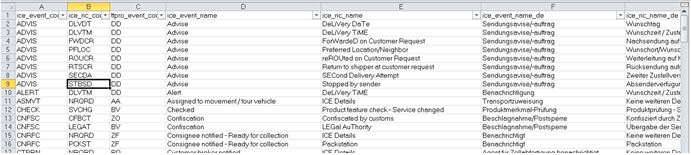
In order to be able to assign the abbreviations of the individual events precisely, or to enrich a self-explanatory explanation, we recommend that you download the table provided here with the various combinations in the current version.
Appendix: ICE_Event_RIC_Combinations_03_2023.csv
Why do I not receive information about the DASS Business functions for valid shipment numbers?
Since detailed information (address data) is made available via the business functions, business customers may only see the shipments that are relevant to them. A check is made here to see whether the shipment is in the customer's number range. If this is not the case, the shipment search is unsuccessful.
Why are shipments not marked as delivered after a long time, even though some have definitely been delivered already?
These shipments are exclusively international shipments. Depending on the destination country, sometimes a shipment can be in transit for more than 3 weeks. Added to this is the fact that some partner countries do not send us any feedback about the delivery. We are doing our best to gradually improve this exchange of communication, however.
When I submit a DASS query, why do I receive the message "The request sent by the client was syntactically incorrect ()."?
Check the request again carefully. The cause is usually a small typing error in the request itself. This may be a missing opening quotation mark or an unclosed element. Also check that you are using the right URL for the function call. A distinction is made between business and public.
Questions about API availability?
Visit our IT-Portal for up-to-date information on IT service incidents, planned maintenance windows, and general availability. You can also opt-in for push notifications to receive proactive updates.
Questions about API content or functionality?
Use the “Notify” feature on this page to automatically receive updates about functional changes and enhancements to this API. You can also view our most recent announcements under the “Notifications” section at the bottom of this page.
Technical Support & Assistance
For further help, please visit our IT-Portal. There you can open a support ticket and receive direct assistance from DHL Support. To help us resolve your issue quickly, please describe your request in as much detail as possible and include traceable excerpts of your web service communication.
Customer Integration Services (CIS)
Business hours: Monday to Friday, 8 a.m. to 16 p.m.
Conditions of Acceptance
This legal notice does not replace and/or modify the applicable "DHL Parcel General Terms and Conditions for Business Customers" available at https://www.dhl.de/de/geschaeftskunden/paket/rund-um-den-versand/agb.html or any other shipping service contracts applicable to your parcel shipments.
This Legal Notice does not replace and/or modify the applicable "DHL Parcel General Terms and Conditions for Residential Customers" available at https://www.dhl.de/de/privatkunden/information/agb.html or any other shipping service contracts applicable to your Parcel Shipments.
If you are acting as a third party software provider, vendor, marketplace operator or otherwise acting as a commercial agent on behalf of DHL and/or its affiliates, i.e., with the consent of DHL and/or its affiliates, you are required to advise the customer (i.e., the applicable shipper of the shipment) of the applicable shipping terms.
You may use the Services and/or data obtained through the DHL Paket DE Shipment Tracking API only for lawful contractual purposes and only in connection with your or the shipping customers' DHL shipments.
The following requirements and/or restrictions apply to the use of and/or access to the DHL Paket DE shipment tracking API:
- Use of access data for DHL shipment tracking (zt-identifier, password). In the case of shop software providers and marketplaces, it must be possible to enter this access data individually for each mail order company.
- Transfer of the access data in the XML request
- The number of queries per client must not exceed the following limits:
- per day (between 12:00 a.m. and 11:59 p.m.) max. 1,000 queries with a total of 10,000 shipments
- max. 3 requests per second
- The shipment status may not be queried again for shipments that have already been delivered..
- When integrating the DHL Paket logo in web applications, the logo specifications at https://www.dpdhl-brands.com/de/dhl/logo-and-claim must be observed.
1.0.0
Change of API Customer Integration Gateway (CIG) endpoint https://cig.dhl.de to new API endpoint https://api-eu.dhl.com/parcel/de/tracking/v0/
Notifications
Liebe Entwickler:innen der Paket DE Verfolgen API,
wir modernisieren derzeit unsere globale API-Plattform, um langfristige Zuverlässigkeit, Sicherheit und Skalierbarkeit sicherzustellen. Unser Ziel ist es, diesen Übergang ohne Auswirkungen auf Ihre Services abzuschließen. Abhängig von Ihrer Systemkonfiguration können jedoch bestimmte Anpassungen oder Prüfungen erforderlich sein.
Weitere Informationen finden Sie unter: https://developer.dhl.com/upcoming-modernization-dhls-api-platform
Mögliche Auswirkungen & empfohlene Maßnahmen
1. Header-Namen werden künftig kleingeschrieben
Nach der Modernisierung werden alle HTTP-Header-Namen ausschließlich in Kleinbuchstaben zurückgegeben, wie es HTTP/2 vorsieht.
Bitte stellen Sie sicher, dass Ihr System Header-Name gemäß der HTTP-Spezifikation als nicht case-sensitiv behandelt.
2. Aktualisierte Netzwerk-IP-Adressen
Die modernisierte Plattform verwendet andere IP-Adressen.
- Die meisten Kunden, die domainbasierte Kommunikation nutzen, müssen nichts unternehmen.
- Kunden mit strikten Firewall-Regeln oder IP-Allow-Lists könnten betroffen sein.
- Eine vollständige Liste der neuen IP-Adressen finden Sie im oben verlinkten Dokument.
3. Empfohlene Nutzung aktueller Verschlüsselungs-Cipher
Die modernisierte Plattform unterstützt weiterhin alle derzeit verwendeten Verschlüsselungsalgorithmen (Cipher).
Ältere oder unsichere Cipher werden jedoch nicht empfohlen, da sie nach der Modernisierung eingestellt werden.
Zeitplan
Die Änderungen werden schrittweise in allen Umgebungen eingeführt:
- Test- und Integrationsumgebungen (api-sandbox.dhl.com):
Die DNS-Umstellung wird bis zum 8. Juni 2026 abgeschlossen sein. - Produktionsumgebung (api-eu.dhl.com):
Die DNS-Umstellung ist für den Zeitraum 22.–29. Juni geplant.
Nach der DNS Umstellung gelten die unter 2. genannten IP Änderungen.
Support
Bei Fragen zu den Änderungen können Sie uns jederzeit über das Help Center des Group API Developer Portals kontaktieren: Group API Developer Portal Help Center. Als angemeldeter Nutzer haben Sie zudem die Möglichkeit, dort ein Ticket zu erstellen und Support zu erhalten.
Viele Grüße
Ihr DHL Team
Dear Developers of Parcel DE Tracking API,
we are modernizing our global API platform to ensure long‑term reliability, security, and scalability. Our goal is to complete this transition without impacting your service, but depending on your system setup, certain adjustments or checks may be required.
For detailed information visit: https://developer.dhl.com/upcoming-modernization-dhls-api-platform
Summary of potential impacts & recommended actions
1. Header names will be lower‑case going forward
After the modernization, all HTTP header names will be delivered back in lower‑case, as required by HTTP/2. Ensure your system treats header names as case‑insensitive, as defined by the HTTP specification.
2. Updated Network IP Addresses
The modernized platform uses a new set of IP addresses.
Most customers using domain‑based communication will not need to take action.
Customers with strict firewall rules or IP allow‑lists may be affected.
All new IP addresses are listed here.
3. Recommended use of Up-To-Date cipher for encrypted connections
The modernized platform will continue to support all ciphers currently being supported, however, older or insecure cipher are discouraged as they will be discontinued after the modernization.
Timeline
The changes will be rolled out in phases across all environments:
- Test and integration environments (api-sandbox.dhl.com): The DNS switch will be completed by June 8 2026.
- Production environment (api-eu.dhl.com): The DNS switch is scheduled to take place between 22-29 June, 2026.
Support
If you have any questions regarding the change, you can contact us at any time via the Group API Developer Portal Help Center. As a logged-in user, you can also create a ticket there to receive support.
Kind regards,
Your DHL Team
DE
Am Sonntag, den 18.05.2025 wird zwischen 10 und 13 Uhr eine neue Version der DHL Sendungsverfolgung API ausgerollt. Während der Arbeiten kann es zu kurzzeitigen Einschränkungen der API kommen.
EN
On Sunday, May 18th 2025 a new version of the DHL shipment tracking API will be rolled out between 10 am and 1 pm. During this time, there may be temporary limitations in using the API.
DE
Am Sonntag, den 18.05.2025 wird zwischen 10 und 13 Uhr eine neue Version der DHL Sendungsverfolgung API ausgerollt. Während der Arbeiten kann es zu kurzzeitigen Einschränkungen der API kommen.
EN
On Sunday, May 18th 2025 a new version of the DHL shipment tracking API will be rolled out between 10 am and 1 pm. During this time, there may be temporary limitations in using the API.
Verfolgen Paket & Waren: Am Sonntag, den 27.04.2025, wird zwischen 10 und 13 Uhr eine neue Version der Funktion ausgerollt. Während der Arbeiten kann es zu kurzzeitigen Einschränkungen bei der Nutzung der Funktion und der API Sendungsverfolgung kommen.
Track Parcel & Goods: On Sunday, April 27th 2025, a new version of the function will be rolled out between 10 am and 1 pm. During this time, there may be temporary limitations in using the function and the Track Parcel API.
Liebe Kund:innen und Entwickler:innen,
wir möchten Sie über Neuerungen zur Nutzung der API Sendungsverfolgung Geschäftskunden (GK) informieren, die ab heute, 13.06.2024 gelten.
Wer ist betroffen?
Alle Kund:innen, die die API Sendungsverfolgung GK verwenden (DASS-B Nutzer).
Was ändert sich?
Die Authentifizierung für die Nutzung der API Sendungsverfolgung GK erfolgt nun über das Post & DHL Geschäftskundenportal (GKP). Bisher verwendete Zugangsdaten zur Nutzung der API Sendungsverfolgung GK wurden in einen „Übergangsbenutzer API Sendungsverfolgung“ migriert. Alle bisherigen Berechtigungen sind weiterhin vorhanden.
Was ist der Übergangsbenutzer?
Der Übergangsbenutzer stellt sicher, dass bisher genutzte Zugangsdaten für max. ein Jahr weiter verwendet werden können.
Was müssen Sie veranlassen?
- Es besteht kein akuter Handlungsbedarf auf Ihrer Seite. Für alle zwischen Januar und Juni 2024 aktiven Nutzer der API Sendungsverfolgung GK wurde durch Einrichten des Übergangsbenutzers sichergestellt, dass die API bis auf Weiteres mit den aktuell verwendeten Zugangsdaten genutzt werden kann.
- Bis spätestens Ende Mai 2025 müssen Sie den Übergangsbenutzers (alte zt-Kennung) durch einen GKP Benutzer austauschen. Wir empfehlen hierfür die Einrichtung eines GKP Benutzers mit dem Typ “Systembenutzer” zur Nutzung ausschließlich in technischen Schnittstellen. Der neue GKP Benutzer muss die Berechtigung für die Funktion „Verfolgen Paket & Waren“ erhalten.
Was können Sie tun, wenn der Zugang zur API Sendungsverfolgung nicht funktioniert?
Im Einzelfall kann es z. B. aufgrund veralteter Daten (abgelaufene Nummernkreis o. ä.) vorkommen, dass kein Übergangsbenutzer angelegt werden konnte. In diesem Fall müssen Sie aktiv einen Benutzer im GKP mit den erforderlichen Berechtigungen anlegen und die Zugangsdaten für die Nutzung in allen API-Aufrufen hinterlegen.
Können die Berechtigungen des Übergangsbenutzers verändert werden?
Es kann vorkommen, dass einzelne Berechtigungen nicht aus dem Altsystem migriert wurden und Ihnen dadurch nur noch öffentliche Sendungsdaten (keine datenschutzrelevanten Daten) angezeigt werden.
Für diesen Fall und auch bei allen sonstigen Fällen fehlender Berechtigungen gilt, dass Sie aktiv einen neuen Benutzer im GKP anlegen müssen. Die GKP Zugangsdaten des neuen Benutzers müssen in allen Aufrufen der API Sendungsverfolgung GK mitgegeben werden.
Kann ich das Passwort für den Übergangsbenutzer ändern?
Für den Übergangsbenutzer ist kein Passwort-Rücksetzung möglich. In diesem Fall muss direkt ein neuer GKP Benutzer angelegt werden. Der Übergangsbenutzer kann ab diesem Zeitpunkt nicht weiter verwendet werden.
Bei Fragen zu Berechtigungen wenden Sie sich bitte an Ihre vertriebliche Ansprechperson.
Bei technischen Fragen erstellen Sie bitte ein Ticket im Group API Developer Portal.
Mit freundlichen Grüßen
Ihr Team Group API Developer Portal
-----
Dear customers and developers,
we would like to inform you about changes to the use of the API Shipment Tracking Business Customers (BC), which apply from today, June 13, 2024.
Who is affected?
All customers who use the API Shipment Tracking BC (DASS-B users).
What is changing?
Authentication for the use of the API Shipment Tracking BC is now carried out via the Post & DHL Business Customer Portal (GKP). Previously used access data for using the API Shipment Tracking BC has been migrated to a “Transition user API Shipment Tracking”. All previous authorizations are still available.
What is the transition user?
The transition user ensures that previously used access data still can be used for a maximum of one year.
What do you need to do?
There is no acute need for action on your part. For all users of the API Shipment Tracking BC active between January and June 2024, setting up the transition user ensures that the API can be used with the currently used access data until further notice.
However, you must replace the transitional user (old zt user) with a GKP user by the end of May 2025 at the latest. We recommend setting up a GKP user with the type “system user” for use exclusively in technical interfaces. The new GKP user must have authorization for the “Track Parcels & Goods” function.
What can you do if access to the API Shipment Tracking does not work?
In individual cases, it may not be possible to create a transition user, e.g. due to outdated data (expired number range or similar). In this case, you must actively create a user in the GKP with the required authorizations and store the access data for use in all API calls.
Can the transition user's authorizations be changed?
It is possible that individual authorizations have not been migrated from the old system and therefore only public shipment data (not data relevant to data protection) is displayed.
In this case and in all other cases of missing authorizations, you must actively create a new user in GKP. The GKP access data of the new user must be entered in all calls to the API Shipment Tracking BC.
Can I change the password for the transition user?
It is not possible to reset the password for the transition user. In this case, a new GKP user must be created directly. The transition user can no longer be used from this point onwards.
If you have any questions about authorizations, please get in touch with your sales contact person.
If you have any technical questions, please create a ticket in the Group API Developer Portal.
Yours sincerely
Your team Group API Developer Portal