Best for:
Container
- Creating a US Domestic container ID and container label
- Managing packages in a container
- Closing a container
Containerization is the operational process of nesting packages to a container, creating a parent-child grouping. Container-level events are created, and the events are cascaded to every package nested within the container.
The following tracking events are possible with containers:
- Shipment Received, Package Processing Pending
- Container Received
- Container Dispatched
- Cross-docked into another DHLeC DC (Distribution Center)
Containerization can be leveraged by high-volume customers who are able to provide:
- Accurate piece-to-container associations
- Barcoded container labels affixed to each container
Shipment preparation and closeout are not tied to the container process. Shipments can be created first, a container can be created, and then the shipments can be added to the container, or a container can be created first, shipments can be created and then added to the container.
The Container API endpoints support:
- Container creation
- Adding packages to a container
- Closing a container (this is separate from shipment closeout)
- Getting an existing container
The operations allowed in the Container API are:
| OPERATION | TYPE | PATH |
|---|---|---|
| Create Container | POST | /shipping/v4/containers |
| Manage Container | POST | /shipping/v4/containers/containerId/packages |
| Close Container | POST | /shipping/v4/containers/containerId /close |
| Get Container | GET | /shipping/v4/containers/containerId |
Two workflows are supported by the Container API:
Workflow A - Create Container First
- Container is created and label is generated.
- Parcels are labeled and then scanned into the container.
- Container is closed when ready for dispatch.
Workflow B - Create Label Parcels First
- Parcels are labeled individually.
- Parcels are scanned into either a new or pre-existing container.
- Container is closed and label is generated (if not created earlier).
NOTE: Shipping label generation and closeouts are separate from the container process.
Container Characteristics
- A unique
containerIdis generated for a pickup and processing location when a container is created. - Packages can only be added or deleted while the container is in an OPEN status.
- Closing a container locks its associations and makes it available for DHL eCommerce operations to scan.
- Containers generate scan events throughout DHL eCommerce handling.
- Container scans cascade to all associated packages.
- Containerization operates independently of manifesting.
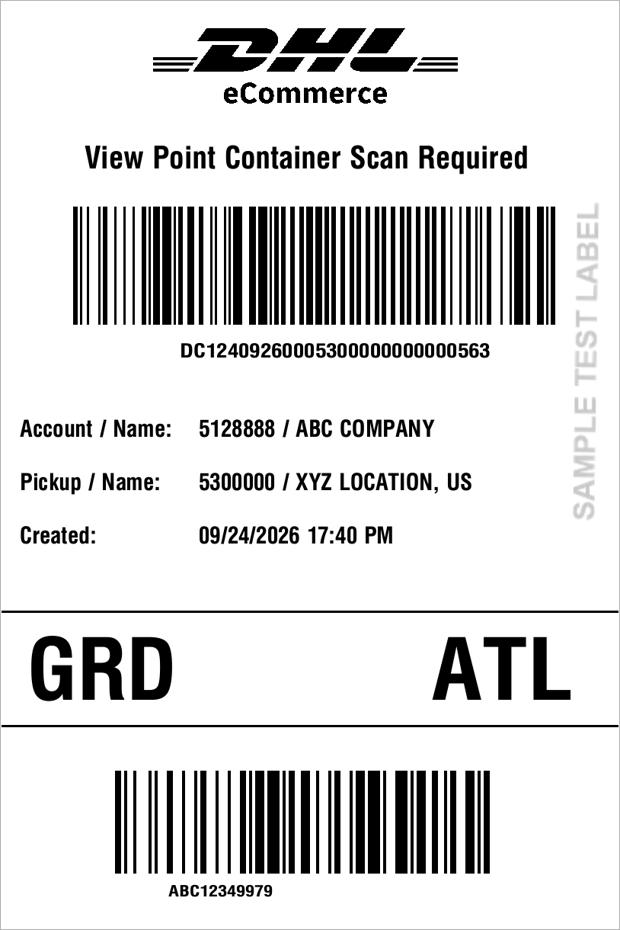
Sample Domestic Container Label
The container label:
- Uses a standard 4-inch by 6-inch format.
- Currently, supports the ZPL file type.
- Includes routing, sort level, and the container ID barcode.
The following is a sample container label.