
Best for:
Return Label
- Creating a US Domestic return label
- Retrieving an existing return label
DHL eCommerce Americas Return Label API allows clients to create a return label for mail item(s) using an optional orderNumber and authorizationNumber.
Scope
The following operations are allowed in the Return Label API:
| Operation | Type | Path |
| Create Return Label (PNG, ZPL, PDF or QR) | POST | /returns/v4/label |
| Get Return Label | GET | /returns/v4/label/pickup |
Each Return Label API request is used to create a single return shipping label.
For every successful label that is created, the response will contain three tracking IDs:
authorizationNumber: Return item authorization number (RMA #)dhlPackageId: DHL-generated package IDtrackingId: USPS IMpb number
Output Formats
The following return label formats are available:
PNGZPLPDFQR(see the *Printerless Returns* section below)
Workflow
Customers can use this API to:
- Create a return shipping label for a single package using a POST request. You can generate the labels in PNG, ZPL or PDF formats. The API returns the label contents directly in the response in the requested format. When
labelDataisZPL, it is provided with anencodeTypeofPLAIN. WhenlabelDataisPNGorPDF, it is provided with anencodeTypeofBASE64. - Acquire an existing return shipping label using the three tracking IDs using a GET request.
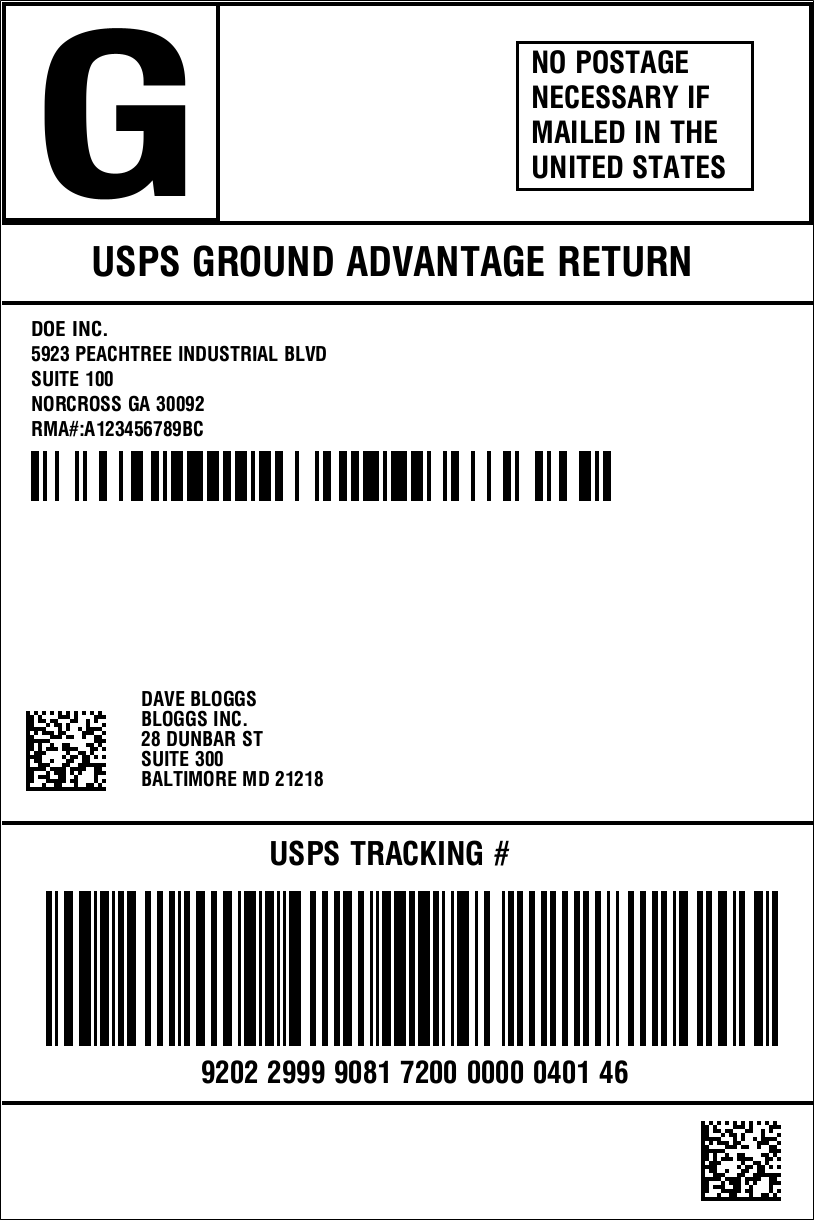
Sample Return Label
Printerless Returns
For your customers who do not have access to a printer or shipping labels, you have the option to provide a printerless return experience via the USPS Label Broker. When creating a return label, the format will be QR and the response will provide an image that contains the USPS Label ID and QR code. You must then send an email to your customer that contains the USPS Label ID and QR code image, see example image below:
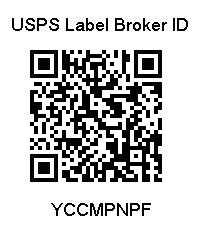
This email should also include the following instructions:
- The customer must bring the QR code image from the email and the ready-to-ship package to a participating Post Office location. Participating locations can be found at https://tools.usps.com/find location.htmlocationType=po&serviceType=lbroretail&address=18702, where the value of the address parameter is customer’s ZIP code (such as
18702in this example). - The USPS retail associate at the counter will then scan the QR code, print the shipping label, and provide the customer with a receipt.
- If the customer has a printer at home, they can instead print the label directly from https://tools.usps.com/label-broker.htm?LabelID=XYZZYPJK&zip=18702, where
XYZZYPJKrepresents the customer’s Label ID and18702represents the customer’s return address ZIP code.
Create Return Label
Body raw
{
 "pickup": "5351244",
 "orderedProductId": "RGN",
 "merchantId": "test",
 "shipperAddress": {
   "name": "John Doe",
   "companyName": "Doe Inc.",
   "address1": "5923 Peachtree Industrial Blvd",
   "address2": "Suite 100",
   "address3": "Bldg 3",
   "city": "Norcross",
   "state": "GA",
   "country": "US",
   "postalCode": "30092",
   "email": "2@y.com",
   "phone": "44423440348"
 },
 "returnAddress": {
   "name": "Dave Bloggs",
   "companyName: "Bloggs, Inc",
   "address1": "28 Dunbar St",
   "address2": "Suite 300"
   "city": "Baltimore",
   "state": "MD",
   "country": "US",
   "postalCode": "21218"
 },
 "packageDetail": {
   "orderNumber": "1234555",
   "authorizationNumber": "A123456789BC",
   "returnReason": "defective product",
   "weight": {
     "value": 4.25,
     "unitOfMeasure": "LB"
   }
 }
}