

The API instances added to your Apps have default configurations for the number of calls per day and per second. This configuration is what we call a "Rate Limit".
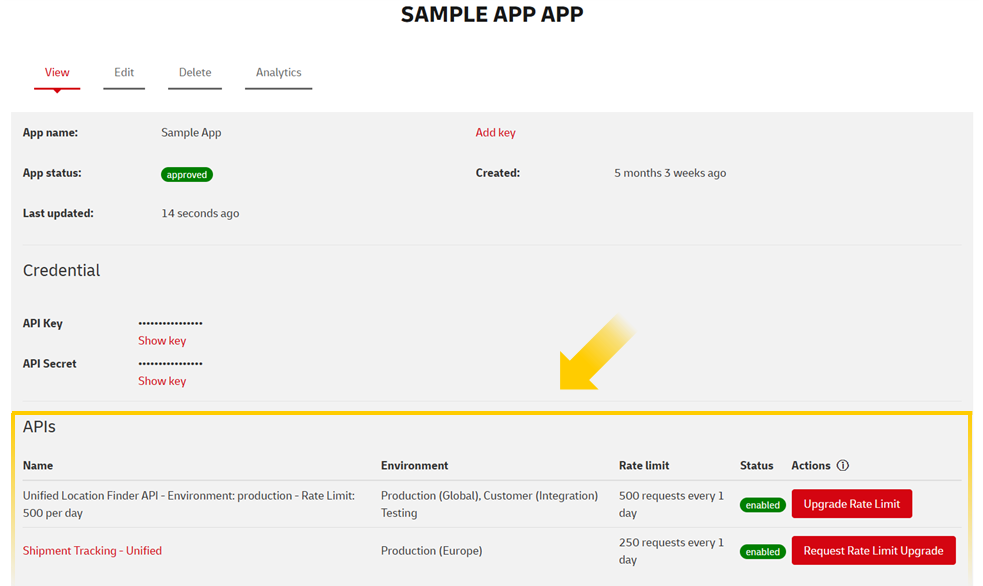
When checking the details of an App, you will find information such as the "App Name", "App Status", or "API Key". You will also see general details of the API instances added there, such as Name, Environment, Rate Limit (calls per day only), Status, and possible Actions.
For example:
Request a Rate Limit Upgrade of a Unified API
In our API Developer Portal, you will find a range of "Unified" APIs, including the Shipment Tracking Unified API (Pull), the Shipment Tracking Unified Push API, and the Location Finder Unified API. The Unified APIs offer the functionality of the API for multiple DHL Divisions.
To request an upgrade, navigate to your profile, open the details of the desired App, and click the red button under the “Actions” section (as shown in the image above). During the upgrade process, you may be asked to provide customer credentials such as your account number, country of registration, and other relevant details.
Request a Rate Limit of a Division-specific API
For other APIs, we recommend you read the documentation of the API you're interested in, focusing on the "User guide" section and "Rate Limit" subsection. During the upgrade process, you may be asked to provide customer credentials such as your account number, country of registration, and other relevant details.
How much extra Rate Limit can be obtained?
This varies from API to API. In general, the number of calls per day provided is proportional to the level of operations that the customer requires. For example, smaller customers who ship low quantities won't need as many calls per day as a global customer shipping exponential values every day.